
Claims 4 min read
Claim Submission Process in Medical Billing Explained
Key takeaways
- Claim submission = prepare + send the 837 electronic claim, then track acknowledgements and status.
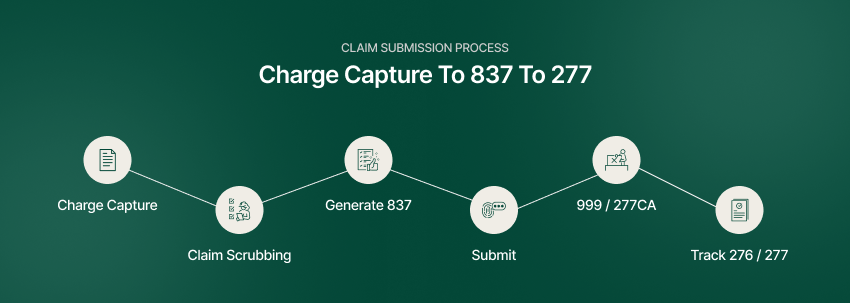
- A 6-step flow: charge capture, scrubbing, generate 837, submit, receive acknowledgements, track status.
- A rejection is a quick data/format fix; a denial is a processed claim needing an investigation and appeal.
- Clean claim rate measures pre-submission edit performance; track payer acceptance and payment separately.
- Pre-submission editing and downstream status tracking serve different purposes; measure each workflow separately.
Getting claims out clean and fast is the heart of the revenue cycle — everything upstream exists to make this step succeed, and everything downstream exists to recover when it doesn’t. This guide walks the claim submission process end to end, from charge capture to the 837 electronic claim and the payer’s acknowledgements, and explains why edit performance, payer acceptance and payment need separate measures.
What is the claim submission process?
Claim submission is the process of preparing and sending a completed insurance claim to a payer for reimbursement — usually as an electronic 837 file through a clearinghouse — and tracking its acknowledgement and acceptance. Done well, it is invisible; done poorly, it generates the rejections and denials that clog your AR.
The claim submission process, step by step
- Charge capture — record services and codes accurately and completely.
- Claim scrubbing — check for coding, eligibility verification and formatting errors before sending.
- Generate the 837 electronic claim file.
- Submit through the clearinghouse to the payer.
- Receive 999 / 277CA acknowledgements — confirm the payer accepted the claim.
- Track status (276/277) and rework any rejections quickly.
Two transactions are worth knowing by name: the 837 is the claim itself; the 276/277 pair is the status inquiry and response. Automating that 276/277 loop is what our claim status automation does, helping staff collect status information and focus on exceptions that need follow-up.
Clean claim vs. rejection vs. denial
- Clean-claim reporting — use a defined edit-performance measure, not payment on first submission
- Rejection — returned before adjudication for a data/format error; fix and resubmit
- Denial — a processed claim the payer declines to pay; requires an appeal (see the denial management process)
Keeping these straight matters because they are worked differently: a rejection is a quick fix, a denial is an investigation.
How to interpret the clean claim rate
Under HFMA CL-1, clean claim rate measures claims passing processing edits without manual intervention relative to claims accepted into the processing tool for billing. Use consistent report definitions and a documented baseline; the percentage does not guarantee payer acceptance or payment. The biggest lever is claim scrubbing before submission — and the biggest upstream input is an accurate eligibility verification process. We explain the calculation, an illustrative example and a measurement checklist in our clean claim rate guide.
How automation speeds clean claim submission
Claims editing checks for issues before submission. Downstream claim-status automation collects payer responses and supports follow-up; it does not replace a claims scrubber or guarantee acceptance or payment. Compare staff effort, exception rates and unresolved work against your own baseline.
Frequently asked questions
What is the claim submission process in medical billing?
Preparing and sending a completed claim (usually an 837 file via a clearinghouse) to a payer, then tracking its acknowledgement and status.
What is an 837 claim?
The standard electronic claim format used to submit healthcare claims to payers.
What are 276 and 277 transactions?
The electronic claim-status inquiry (276) and the payer’s status response (277).
What is a clean claim rate?
Under HFMA CL-1, it is the percentage of claims passing processing edits without manual intervention out of claims accepted into the processing tool for billing. It does not measure payment on first submission.
How can I reduce claim rejections?
Scrub claims for coding, eligibility and formatting errors before submission, and track acknowledgements to catch issues fast.
How long does a payer take to process a claim?
Electronic claims are typically adjudicated within 14–30 days, though it varies by payer and claim type.
Related reading
- Clean Claim Rate: Benchmarks and How to Improve It
- Eligibility Verification Process in Medical Billing
- The Denial Management Process: 7 Steps
After claims are accepted, automate payer-status research, aging-based prioritization, and exception routing so collectors can focus on action.