Eligibility 5 min read
Eligibility Verification Process in Medical Billing (Step by Step)
Key takeaways
- Eligibility verification confirms coverage, plan status, and available benefits before service — an important front-end control for avoidable billing errors.
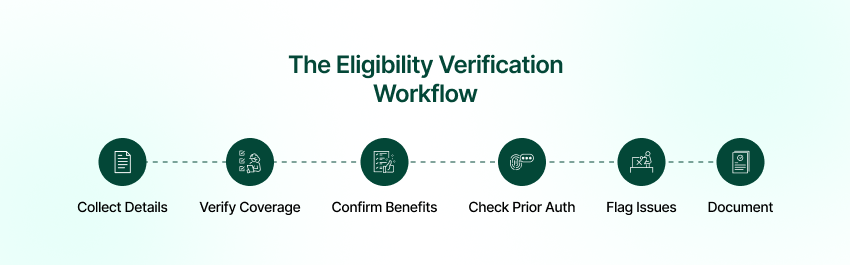
- A 6-step process: collect details, verify coverage, confirm benefits, check prior-auth needs, flag issues, document results.
- Teams can combine batch verification ahead of the schedule with real-time checks for same-day and walk-in patients.
- A wrong member ID, inactive plan, or missed prior-authorization requirement are examples of potentially avoidable billing and denial triggers.
- Automated, real-time checks across payers catch coverage problems before the visit, at scale.
Eligibility verification is a front-end control for confirming coverage and available benefits before service. A consistent process can surface inactive coverage, member-data mismatches, and benefit questions before they become downstream billing work. An eligibility response informs the workflow but does not guarantee reimbursement for a later claim.
This guide walks the eligibility verification process step by step, the errors that cause denials, and how automation makes verification consistent at scale. Eligibility is tightly linked to prior authorization and to a clean claim submission process — both covered in their own guides.
What is eligibility verification in medical billing?
Eligibility verification is the process of confirming a patient’s insurance coverage, plan status, and available benefits before services are rendered — including returned co-pay, deductible, coverage, and service-type information. It helps staff identify questions that require payer or plan review before service.
CMS identifies ASC X12N 270/271 Version 5010 as the adopted eligibility inquiry and response standard. CMS also notes that returned eligibility information does not guarantee reimbursement for a later claim; see the operating-rules FAQ.
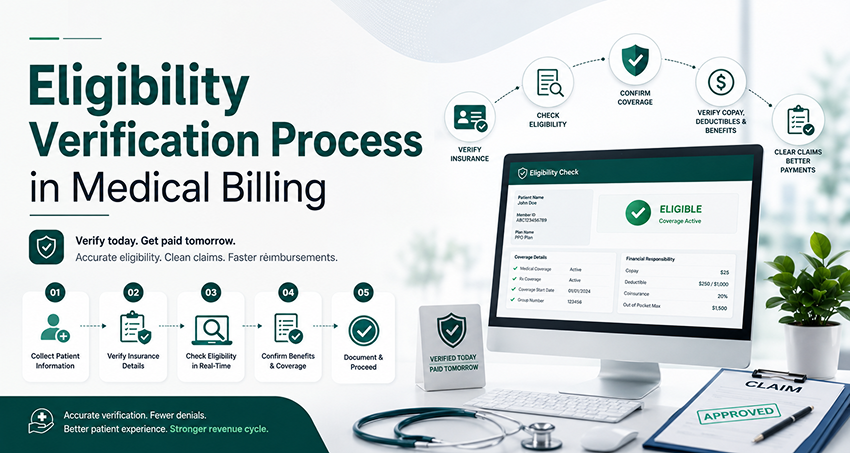
The eligibility verification process, step by step
- Collect patient and insurance details at scheduling or registration.
- Verify active coverage with the payer — real-time 270/271 transaction or portal lookup.
- Confirm plan-specific benefits — co-pay, deductible, coverage for the specific service.
- Check whether prior authorization or a referral is required (and start it early if so).
- Flag issues — inactive plan, wrong ID, non-covered service — before the visit.
- Document results in the system so front-desk and billing teams can act on them.
Common eligibility errors that cause denials
- Wrong or expired member ID, or a demographic mismatch
- Plan inactive on the date of service
- Service not covered, or the benefit is exhausted
- Missing prior-authorization requirement not caught up front
Each of these is cheap to catch at registration and expensive to discover after adjudication. That asymmetry is the business case for rigorous, early verification. Use the eligibility verification automation ROI calculator to model labor capacity with your own volumes and costs.
Eligibility verification checklist for the date of service
Use this operational checklist to record what was returned and what still needs review. It is not a substitute for payer-specific benefit, authorization, or claim-adjudication rules.
- Match the patient, subscriber, member ID, payer, and intended service date.
- Record returned coverage status, effective dates, and termination dates when available.
- Review returned benefits for the requested service type, including deductible, copay, and coinsurance information.
- Keep benefit verification separate from any required referral or prior-authorization confirmation.
- Save the inquiry and response timestamp, reference, unresolved questions, and staff owner in the approved system.
- Route missing, rejected, or conflicting responses to staff; document the resolution before treating the check as complete.
Before automating the checklist, review the eligibility payer coverage directory and validate the particular payer and workflow. RCM Edge’s Eligibility Verification currently supports 566 payer connections; that is separate from the Claim Status network.
Real-time vs. batch verification
Real-time verification (270/271) checks a patient at scheduling or check-in and can support same-day and walk-in workflows. Batch verification runs ahead for scheduled appointments. Teams can use batch verification for the schedule and real-time checks for exceptions and add-ons.
How automation helps prevent eligibility-related denials
Automated eligibility workflows can reduce repeatable checks and flag incomplete or conflicting responses for staff review. See how RCM Edge handles insurance eligibility verification across 566 supported payer connections and how front-end exceptions connect with denial management downstream.
Frequently asked questions
What is the eligibility verification process?
Confirming a patient’s active coverage, plan status and benefits before service — including co-pays, deductibles, coverage limits, and prior-auth requirements.
Why is eligibility verification important?
It can surface coverage, member-data, and benefit questions before service so staff can review them before claim submission.
What should you check during verification?
Active coverage, member ID accuracy, plan benefits for the specific service, patient responsibility, and whether prior authorization or a referral is required.
What is a 270/271 transaction?
The standard electronic eligibility request (270) and response (271) exchanged with a payer for real-time verification.
How far in advance should you verify?
Set the verification schedule according to your organization’s policy, payer requirements, appointment lead time, and time needed to resolve exceptions. Check eligibility for the intended date of service, and recheck when insurance details or the appointment change, or when your workflow requires an updated response. A fixed 24–48-hour interval should not be presented as a universal payer rule.
Can eligibility verification be automated?
Yes. Software can submit supported eligibility inquiries, organize returned information, and route incomplete or conflicting responses to staff. Confirm payer coverage, required enrollment, service-type support, and the exception workflow before rollout. Eligibility information does not guarantee authorization or payment.
Related reading
- Claim Submission Process in Medical Billing Explained
- Denial Management in Healthcare
- How to Reduce Days in AR
Automate eligibility checks with Edge Verify, explore the broader RCM automation workflow, or Book a 30-Minute Demo.